
Walker Guide
A tour of the app for shelter walkers.
Jump to…
Signing in
DWA uses your Google account. Tap Sign in with Google on the launch screen and pick your address. If you’re new, you’ll land on a request-access form — fill it in and an admin will be notified. Once an admin approves you, you’ll get a welcome email, and your next Google sign-in will let you straight in. If sign-in keeps failing, message an admin.
Add to your home screen
Install DWA as an app icon so it opens full-screen, without the browser bar.
Android (Chrome)
- Open dwa.kirbsauce.com in Chrome.
- Tap the ⋮ menu (top right) and choose Add to Home screen — or tap Install if Chrome already offered you a banner.
- Confirm by tapping Add / Install.
iOS (Safari)
- Open dwa.kirbsauce.com in Safari.
- Tap the Share icon (the square with an arrow pointing up).
- Scroll down and tap Add to Home Screen.
- Tap Add in the top right.
Either way, you’ll get a DWA icon on your home screen that opens the app full-screen, just like a native app.
The roster screen
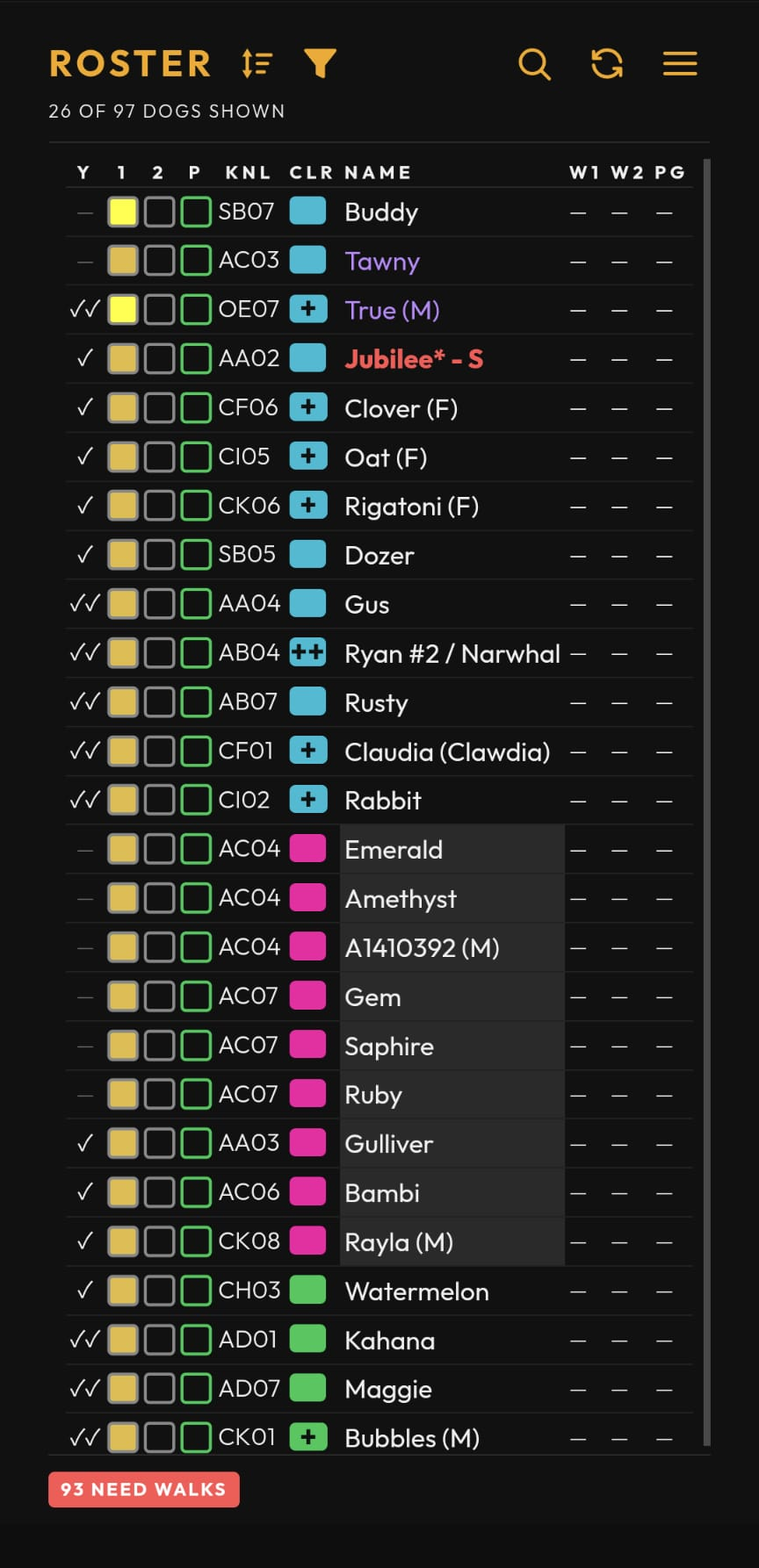
The roster lists every walkable dog in the kennel today, ordered by the current sort (WALK ORDER by default). Each row shows, left to right:
- Y — yesterday’s activity at a glance (walked once, twice, playgroup, or nothing / recent surgery).
- 1 · 2 · P — status icons for Walk 1, Walk 2, and Playgroup. A filled, checked icon means done; an outline means pending. Color highlights flag what’s urgent or reserved (see Cell colors).
- KNL — the kennel to find the dog in (e.g.
AC03). - CLR — the dog’s color grade (see Color grades).
- NAME — the dog’s name.
- W1 · W2 · PG — the time each activity was logged, or a check once done.
- ⋮ — a kebab menu, shown if you’re flagged as a trainer and/or playgroup lead (set by an admin), or if your account role is admin. Tap it for Reserve for Training / Unreserve for Training and/or Reserve for Playgroup / Unreserve for Playgroup — toggles the dog’s reservation right from the roster, no confirm needed. See Reservations for how a reservation then displays.
Tap any row to open the dog’s page — that’s where you log walks, check kennel location, and read notes.
Below the table, a row of pills summarizes what’s outstanding: a N NOT
WALKED count (dogs with no activity logged today) that’s always shown — red
while dogs still need a walk, green once it hits zero — and, when applicable,
N TRAINING RSVD / N PLAYGROUP RSVD counts for dogs reserved but
not yet attended. These counts reflect the full roster regardless of any
active filter (see Filters).
The dog detail page
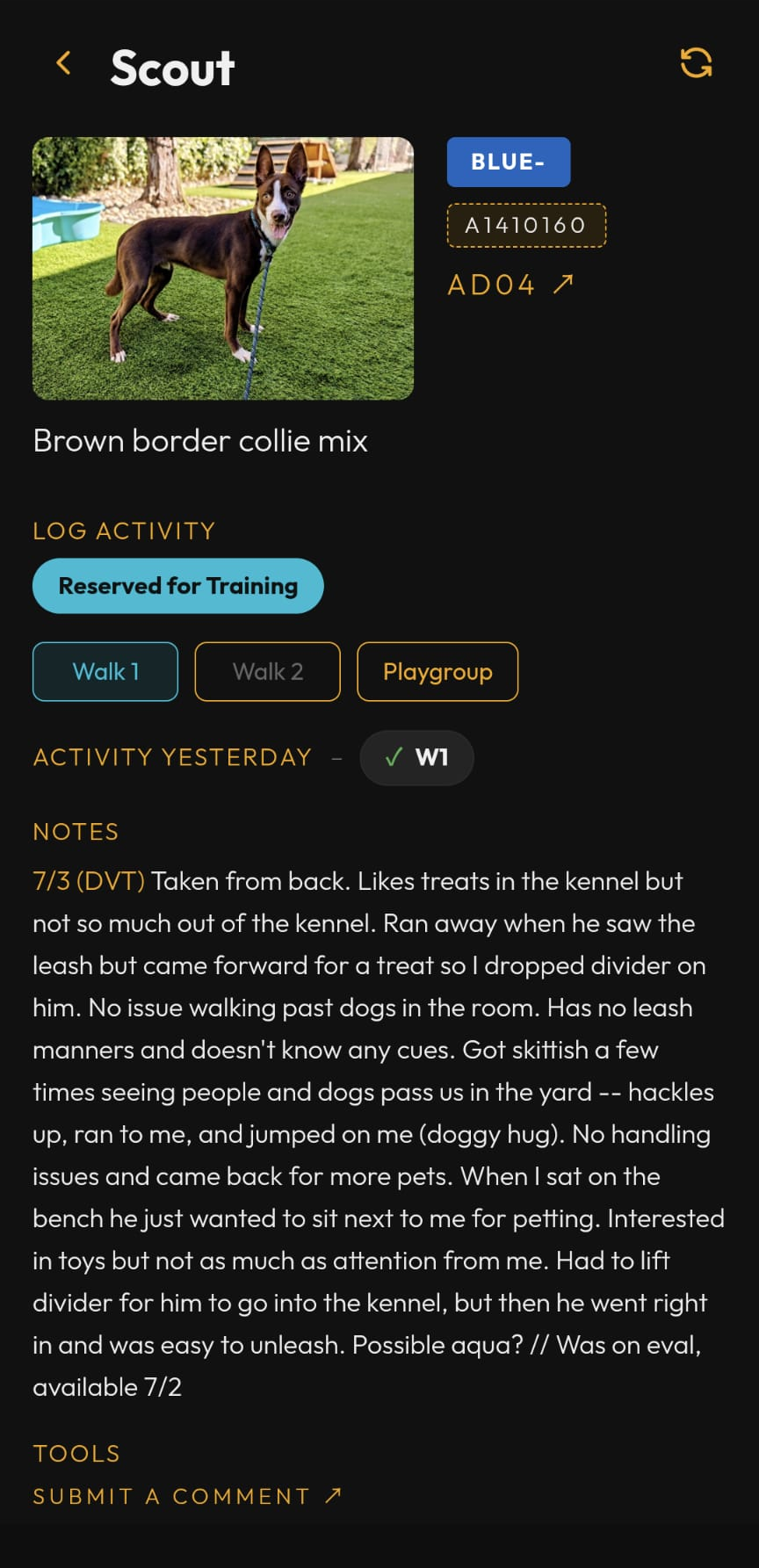
The photo sits on the left, with the dog’s details stacked beside it:
- Photo — tap it to view full-screen.
- Kennel (e.g.
AC03) — tap it to jump straight to the Kennel Map, centered on that dog’s room. - Color — the dog’s color grade (see Color grades).
- ID — tap it to copy the animal ID to your clipboard; the button flashes Copied! for a moment to confirm.
- Breed — when the dog’s record has one.
- Other information may show up below these, when it applies to that dog — Potty Dog (or Bold Potty Dog) and Adoption hold.
- Standing cautions stack below the photo, one per line and in red, each spanning the full width of the page: DROP DIVIDERS, LIMITED ACTIVITY - SEE NOTES (an activity restriction — check the dog’s notes for details), Recent surgery - NO RUNNING, and any other caution flagged on that dog. A dog shows these whether or not it has any notes written.
Logging a walk
At the top of the page you’ll see three buttons:
- Log Walk 1 / Log Walk 2 — separate buttons for each walk. Walk 2
stays greyed out until Walk 1 is logged. Once logged, a button turns green
and shows the time it happened, e.g.
8:47am. - Log PG — logs playgroup attendance, with the same green-with-time treatment once logged.
Tap an already-logged button to undo a mistake — a red-bordered warning confirms first, showing how long ago it was logged, before permanently clearing it. Walk 1 locks (can’t be tapped) while Walk 2 is still logged; clear Walk 2 first if you need to undo Walk 1.
Walkers can’t undo a walk more than 30 minutes after logging it — the button shows a notice asking you to contact an admin instead. Admins aren’t limited by this. Playgroup has no time limit.
Reservations
A dog can be reserved before you walk it. When so, a pill appears above the buttons:
- Reserved for Playgroup (green) — hold the dog for playgroup.
- Reserved for Training (cyan) — the Log Walk 1 button also gets a cyan border. Unlike other button styling, this doesn’t clear once Walk 1 is logged — it stays cyan until the training reservation itself is removed, the same behavior the roster’s Walk 1 icon has (see Cell Colors).
Activity notes
Below the buttons, each activity’s most recent note from today is listed — or “No activity today” if nothing’s been logged yet. For the dog’s full history, see Activity History below.
Activity History
In the TOOLS section at the bottom of the page, tap Activity History to open the dog’s full W1/W2/PG note history, grouped by day with the most recent day first. If the dog has no notes at all yet, it shows “No history” instead.
Notes
Further down, a NOTES section holds the dog’s ongoing care and behavior notes — anything worth knowing before you walk it. Words in ALL CAPS (like DROP DIVIDERS or NO CATS) are highlighted in red so warnings jump out.
Playgroup notes
Dogs with playgroup notes get a collapsed PLAYGROUP NOTES section below NOTES — tap the title to open it. Inside is the dog’s Playstyle and its dated playgroup notes.
Tools
At the bottom, a TOOLS section holds the dog’s history and links out to other systems:
- Activity History — opens the dog’s full note history in a popup, without leaving the page (see Activity History above).
- Submit a Note for
<Dog>/ Submit a Medical Ticket / Submit a Kennel Ticket — opens a form to report something about the dog or the kennel. Each form comes prepopulated with available information. (A behavior ticket isn’t offered from a dog’s page — file one from Resources.) - View on Pet Compass / View on Pet Harbor — opens the dog’s record in the county’s own systems.
- Verify Kennel — cross-checks the dog’s kennel against Pet Compass and flags it if they don’t match.
Color grades
Every dog wears a color from easiest to hardest:
Pink → Green → Aqua → Blue− → Blue → Gold− → Gold → Red → Black
Your own color grade (shown in Settings → WALKER PROFILE, set by an admin) is the hardest color you’re cleared to walk. You can walk any dog at or below your grade. Dogs above your grade appear dimmed and drop to the bottom of the list when a view-based sort like WALK ORDER is active.
Dogs flagged for special handling always display as Red, regardless of their usual color grade — treat these with the same caution as any other Red dog.
Cell colors
The status-icon highlights on the roster tell you what’s pending:
- Yellow / amber on a walk icon — that walk slot is urgent.
- Green on Playgroup — the dog is reserved for playgroup but hasn’t attended.
- Cyan on Walk 1 — the dog is reserved for training. Unlike the other highlights, this one doesn’t clear once Walk 1 is logged — it stays cyan (with a checkmark drawn on top) until the training reservation itself is removed.
Once an activity is logged, its highlight clears and the check wins over the color — except cyan, which persists for the life of the reservation (see above).
The WALK ORDER sort
The default WALK ORDER sort puts the hardest color you can walk at the top. Within a color, dogs run urgent (yellow) → amber → neutral → reserved → done. Dogs above your color grade fall to the bottom, dimmed.
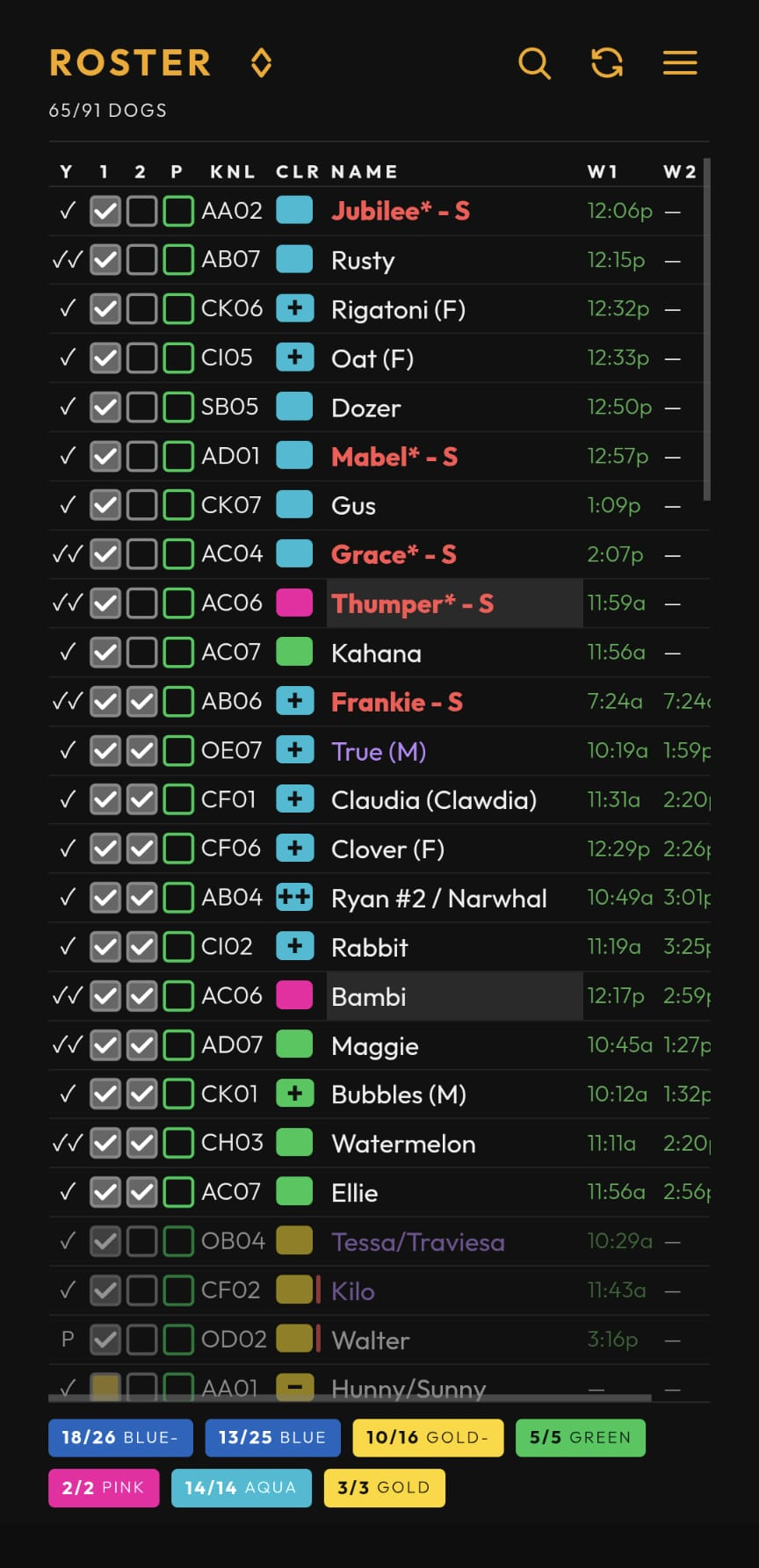
This example is what an Aqua-level walker sees — which dogs sit at the top, and which dim out, depends on your own color grade.
Open the SORT BY overlay from the sort icon in the header to pick another sort. View-based sorts like WALK ORDER are one-way orderings — the A → Z / Z → A toggle only applies to plain field sorts (Kennel, Color, Name). Use CLEAR SORT to drop back to the default.
The overlay also offers a PLAYGROUP sort: instead of walk urgency, it groups dogs already reserved for playgroup (and not yet attended) using the same grouping as the Playgroup screen, with a REMAINING ROSTER group underneath, in plain WALK ORDER, for everyone else. If nobody’s currently reserved, it shows “No dogs currently reserved for playgroup” instead.
Both WALK ORDER and PLAYGROUP are available to every role, including guests — since a guest account has no color grade of its own, it’s treated as Gold for grouping/dimming purposes in either sort.
Filters
Tap the filter icon next to the sort icon to narrow the roster. COLORS
lets you multi-select color grades and either show only those (ONLY) or
hide them (NOT). Filters such as Playgroup (reserved) and Training
(reserved) each have
a checkbox to turn that filter on, plus an ONLY / NOT toggle for
which way it applies once checked — unchecking turns the filter off without
losing your ONLY/NOT choice. While any filter is active
the filter icon highlights and the count under ROSTER switches to
SHOWING X OF Y DOGS. Tap CLEAR FILTERS to reset everything.
The Search screen
Open Search from the nav menu to find a dog by name, ID, kennel, breed, color, or even a word from its notes — matches appear as you type, with name matches listed first.
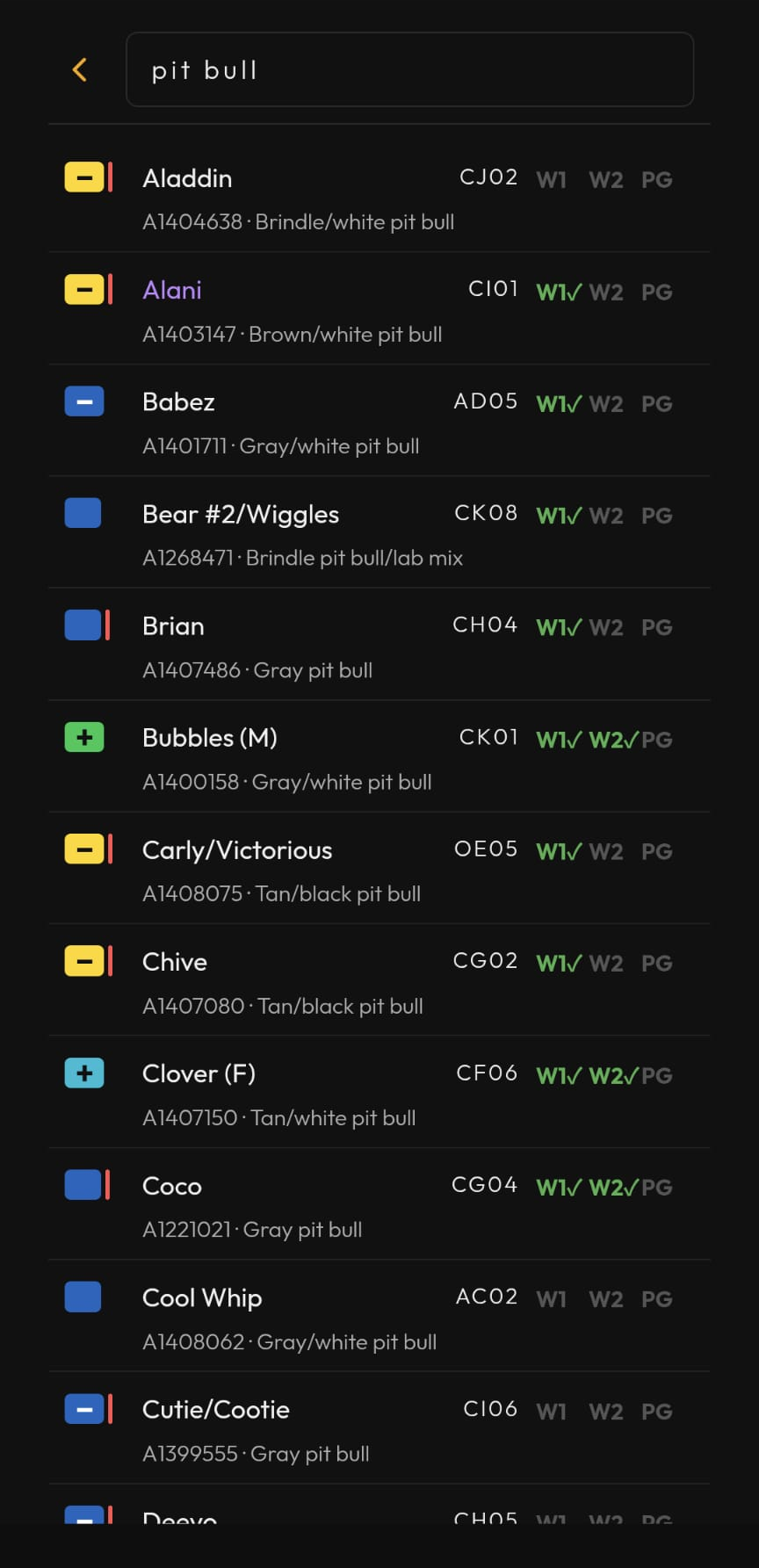
Each result shows the dog’s color, name, kennel, and today’s W1 · W2 · PG ticks (green once logged). Tap a result to open that dog’s page.
My Log
Open My Log from the nav menu to see your own walk-toggle history — every W1/W2/PG you’ve logged, newest first, grouped under TODAY, YESTERDAY, and earlier day headings. Each row shows the time, the dog’s name, and which activity was toggled, with a green checkmark for checked or a red ✕ for unchecked. Tap a row to open that dog’s page.
The Kennel Map
Open Kennel Map from the nav menu — or tap a dog’s kennel on its detail page to jump straight there, centered on that room.
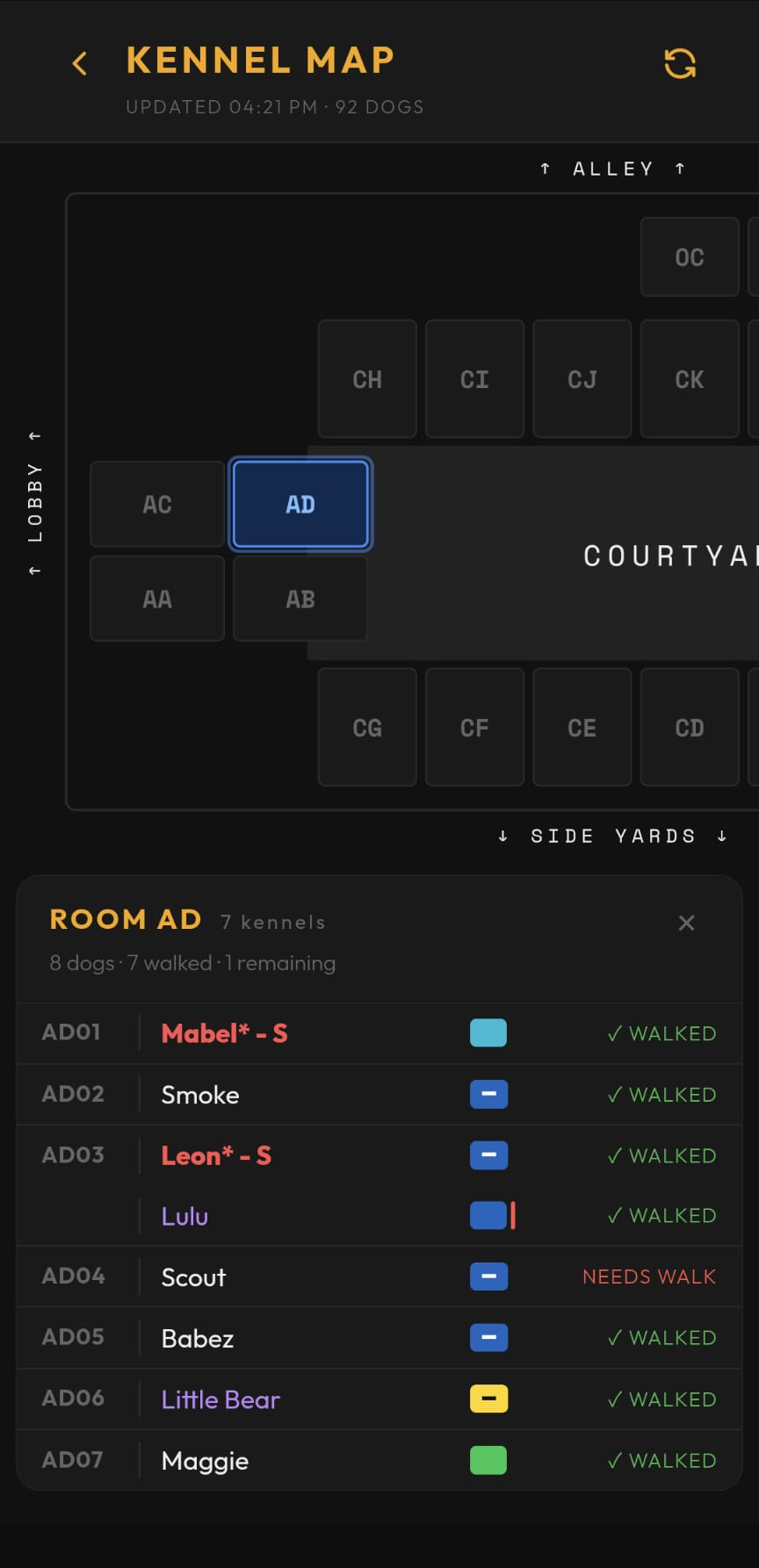
Tap a room to see its kennels. Each row shows the dog’s name, color, and walk status (✓ WALKED, ✓ PLAYGROUP, or NEEDS WALK), plus a running tally of how many dogs in that room still need a walk. Tap a dog’s row to open its detail page.
Kennels that look empty, or dogs that aren’t on your walk list, can still show up here — the map cross-checks against Pet Compass, so it’ll flag a mismatch (⚠) if a dog is actually housed somewhere different than the roster says. A dog with no Pet Compass record at all gets its own ⚠ NOT IN PC badge instead, not a mismatch to fix.
An animal Pet Compass puts in a kennel that isn’t on your walk list gets a blue italic row of its own — Buddy (A1402638) - not on walk list, or just the A-number and a sex letter when Pet Compass has no name for it. Tap the row to open that animal’s Pet Compass record, which is where to check whether the kennel it’s listed in is still right. There’s no highlight marking these as tappable, and a record with no A-number has nothing to open, so that one is a plain row.
The Playgroup screen
Open Playgroup from the nav menu to see the roster grouped the same way the shelter’s own Playgroup tracking does, rather than by walk urgency.
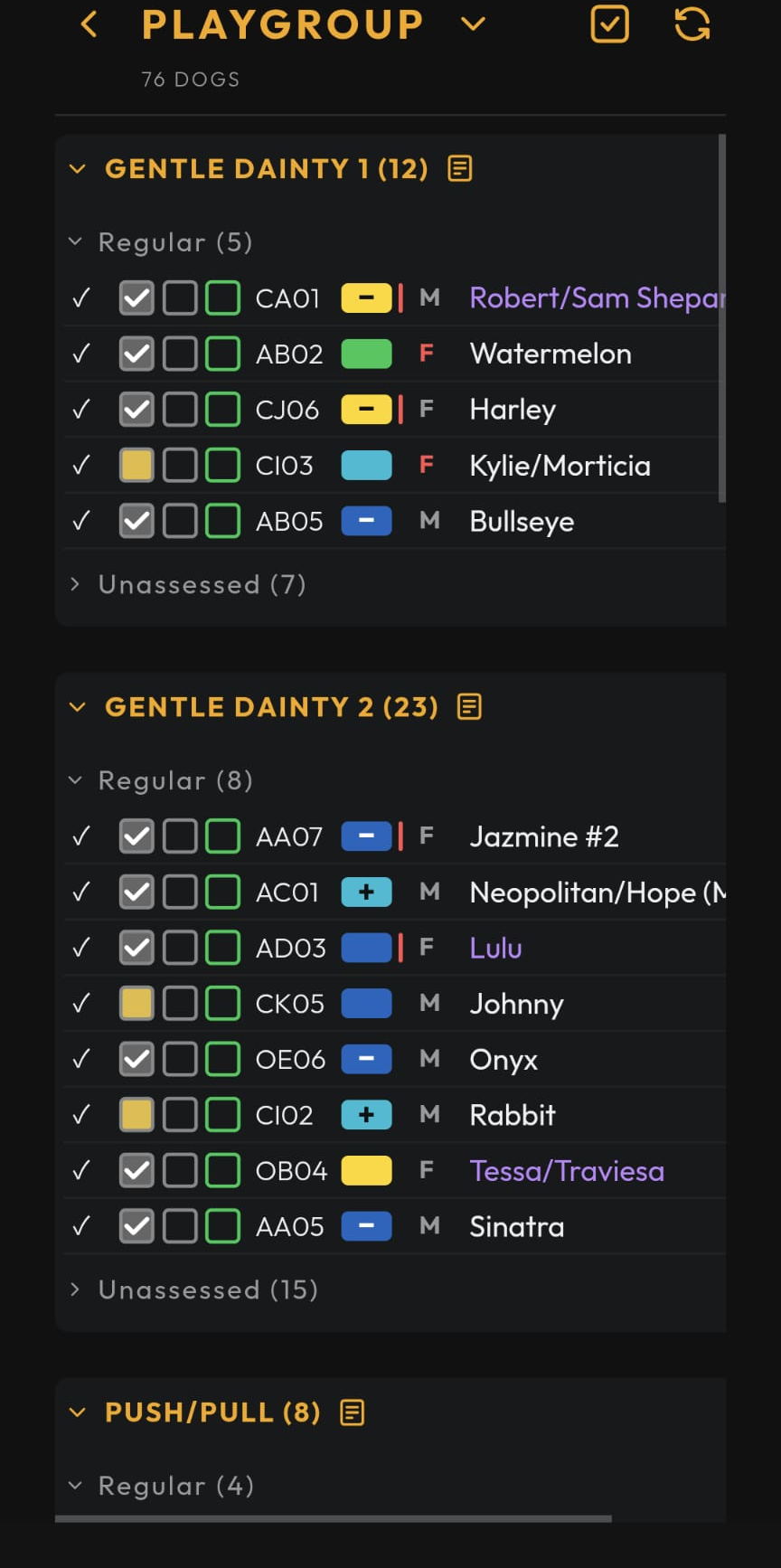
Dogs are grouped by their Playgroup Style — Gentle Dainty 1, Gentle Dainty 2, Push/Pull, and Rough/Rowdy — each split into Regular and Unassessed subgroups. Dogs with no Style or Cat info fall under Unassessed. Dogs tagged for something other than regular playgroup show up in their own groups instead: Selectives (subgrouped per selective tag, with buddy dogs or a NEED INSTRUCTIONS note), Projects, and No Playgroup (holds like Behavior, Does Not Benefit, Medical / Age, Investigation, or Recent Surgery). Each group header shows a count and a chevron to collapse/expand it. Tap a dog’s row to expand/collapse its PG notes. Long-press (hold) a row to open the dog’s detail page — double-click does the same on desktop/mouse. Logging or unlogging a dog’s playgroup attendance is done from the dog’s own page (see FAQ), not from this screen.
Style/Cat/Buddies/Sex/Alt/Time/PG Notes update automatically as they change. If a change was made by editing the Playgroup sheet directly rather than through the app — e.g. staff physically moving a dog and updating the tab by hand — it can take up to ~10 seconds to show up here.
Managing playgroup reservations
If you’re flagged as a playgroup lead (set by an admin) or your account role is admin, you get one extra tool:
- Bulk Reserve — a header icon that puts every row into a checkbox select mode, pre-checked for dogs already reserved. Check or uncheck any dogs, then Save (only the dogs you actually changed are sent) or Cancel (discards everything, no writes). Save shows a summary of how many dogs were reserved, unreserved, already correct (no change needed), and — if any failed to save — which ones, left selected so tapping Save again retries just those.
Behavior Modification
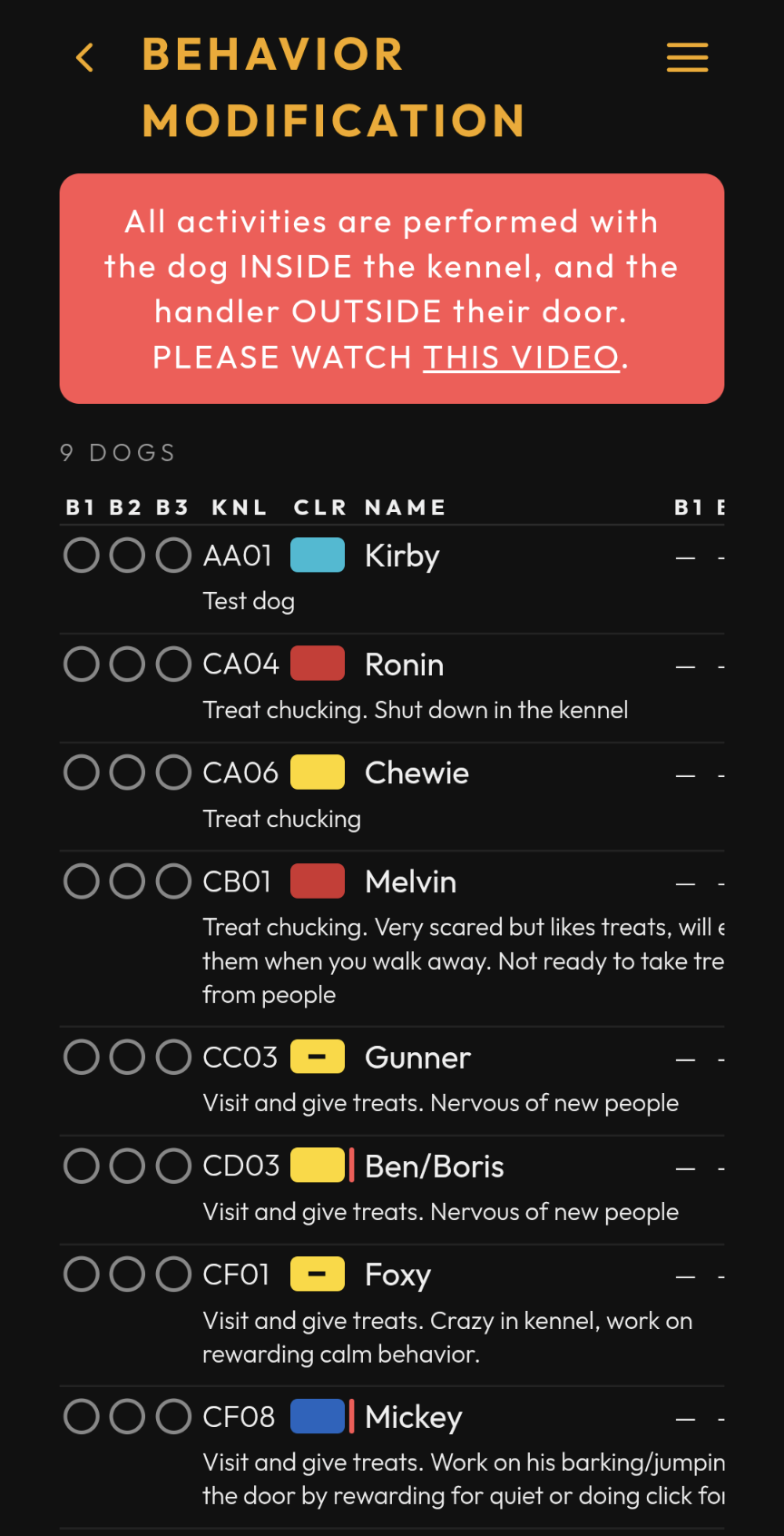
Behavior Modification (in the nav menu, just under Playgroup) is a separate list from the roster, for dogs working through a behavior plan. It reads like the roster — kennel, color, name — but it is ordered by kennel, so you can work a room at a time, and each dog’s behavior note sits on its own line underneath. That note is the handling protocol written for that dog, and it is not the same text as the walk notes on their dog detail page.
A red banner at the top of the page is a reminder that all activities are performed with the dog inside the kennel and you outside their door. Its this video link opens the behavior modification training video — please watch it before you start. The video is also under Guides in Resources.
The B1, B2 and B3 columns are the day’s three session slots, and they work the way the walk columns do: a time once logged, a dash until then. They clear overnight along with the walk checkboxes.
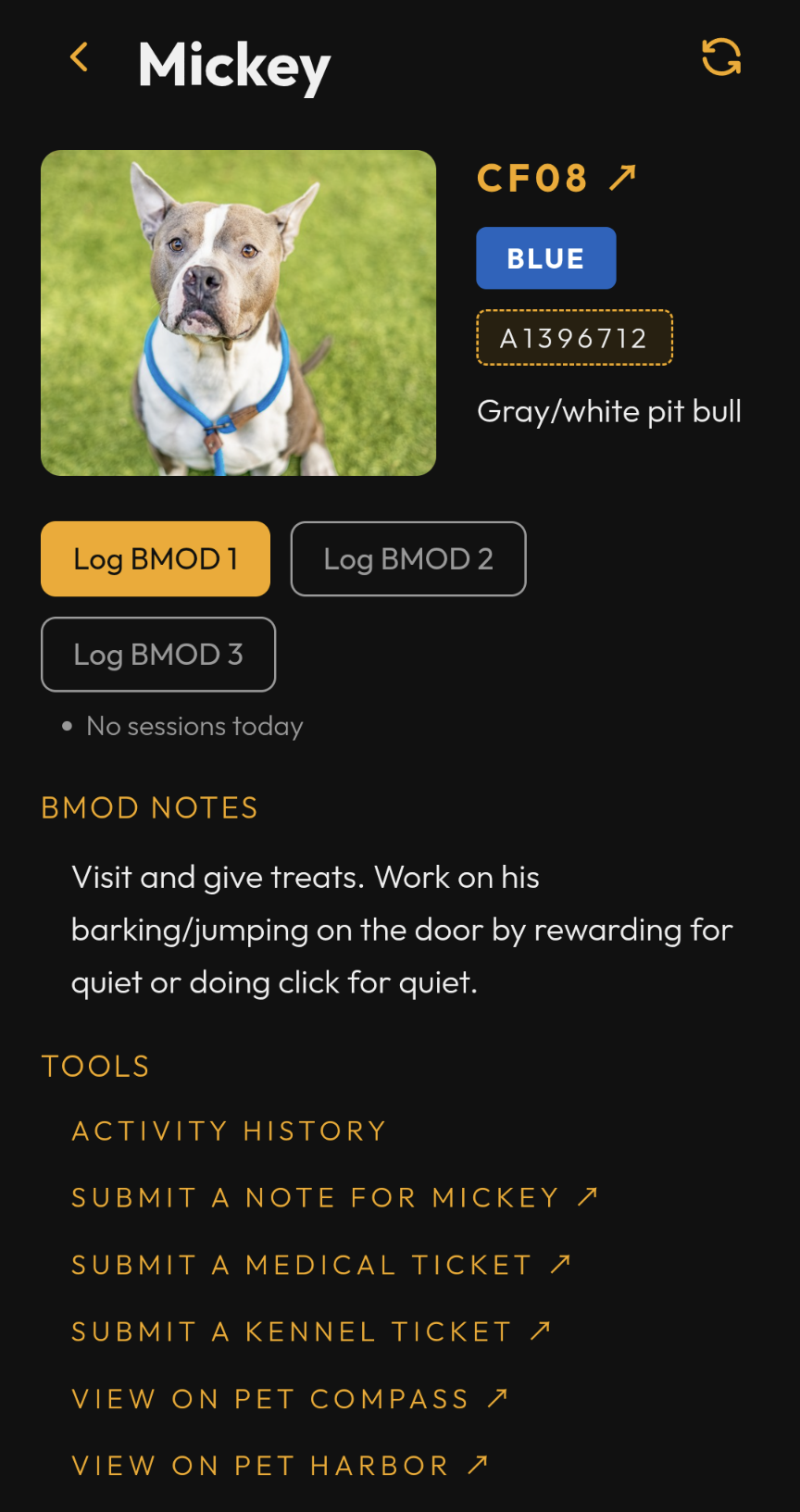
Tapping a dog opens their behavior page, which shows their photo, kennel, color, breed, standing cautions and their behavior note under BMOD Notes, plus three buttons — Log BMOD 1, 2 and 3 — for recording a session. Each asks you to confirm, then stamps the time.
Below the buttons, each session’s most recent note from today is listed — who logged it and when — or “No sessions today” if nothing’s been logged yet. It works like the list under the walk buttons on a dog’s detail page.
Sessions are logged in order and cleared in reverse. You can’t log the second until the first is logged, or the third until the second is. Likewise, you can’t clear the first while the second is still logged, or the second while the third is. A button that isn’t available yet is greyed out. And as with walks, clearing a session you logged more than 30 minutes ago needs an admin.
A few things that surprise people:
- A dog can be on both lists, or on this one only. The two are kept separately, so a dog in behavior modification doesn’t have to be on the roster at all — and nothing on this page is pulled from their roster entry even when they have one.
- There’s no color-grade limit here. Unlike walking, the list shows every dog in behavior modification regardless of your grade, and doesn’t dim anything.
- The roster gives no sign a dog is in behavior modification. This page is the only place that shows.
- Sessions count as your activity. They appear in My Log and in a dog’s activity history alongside walks, labelled B1/B2/B3 rather than W1/W2/PG.
Resources
The Resources screen (in the nav menu) has six sections:
- Guides — a Walker Guide link that opens this guide in your browser (plus an Admin Guide link, admins only), and a Behavior Modification Video link to the training video.
- Volunteer Shifts — a Shift Calendar link that opens the week’s volunteer shift sign-ups (see Shift Calendar below).
- Submissions — Submit a Note / Submit a Medical Ticket / Submit a Behavior Ticket / Submit a Kennel Ticket, blank: from here there’s no specific dog to pre-fill them with. All but the behavior ticket are also on a dog’s own Tools menu, pre-filled; a behavior ticket can only be filed from here.
- Adopter Resources — a QR code for the adoption info page. Tap it to open, or let an adopter scan it to share the info.
- Other — Pet Compass / Pet Harbor links for looking up an animal directly, without a dog pre-filled (a dog’s own Tools menu offers the same lookups already pointed at that dog).
- Feedback — a Submit Bug/Enhancement button for reporting a problem or requesting a feature.
Shift Calendar
Resources → Volunteer Shifts → Shift Calendar opens a week-at-a-glance view of who’s signed up for dog-walking shifts, read from the shelter’s Bloomerang Volunteer sign-up portal. It’s a quick way to see where coverage is thin before you commit to a shift.
It shows one Sunday–Saturday week at a time. Use the ‹ / › chevrons to page to the previous or next week — the calendar covers the current week plus the next three. The week’s dates sit between the chevrons, today’s column is highlighted, and days already past are dimmed.
Days run across as columns; the three daily shifts stack down the side, numbered 1, 2, 3 (morning, mid-day, afternoon). Each cell holds three little bars — one per handler color, Green, Blue, Gold — and each bar fills in proportion to how full that color’s slots are: an empty bar means no one’s signed up for that color yet, a full bar means it’s fully booked. Handler colors line up with the walk color grades — a Blue handler slot is for walkers cleared up to Blue, and so on.
Tap any cell for the exact numbers: for each color, how many are signed up out of the total slots, and how many are still open.
The calendar is read-only. To actually claim a shift, use the Bloomerang Volunteer portal itself. The counts refresh every few minutes.
Walker Activity
Open Walker Activity from the nav menu to see who else is at the shelter today. Where My Log is your own history, this is everyone’s — one row per walker who’s logged a walk or playgroup today, most recently active first.
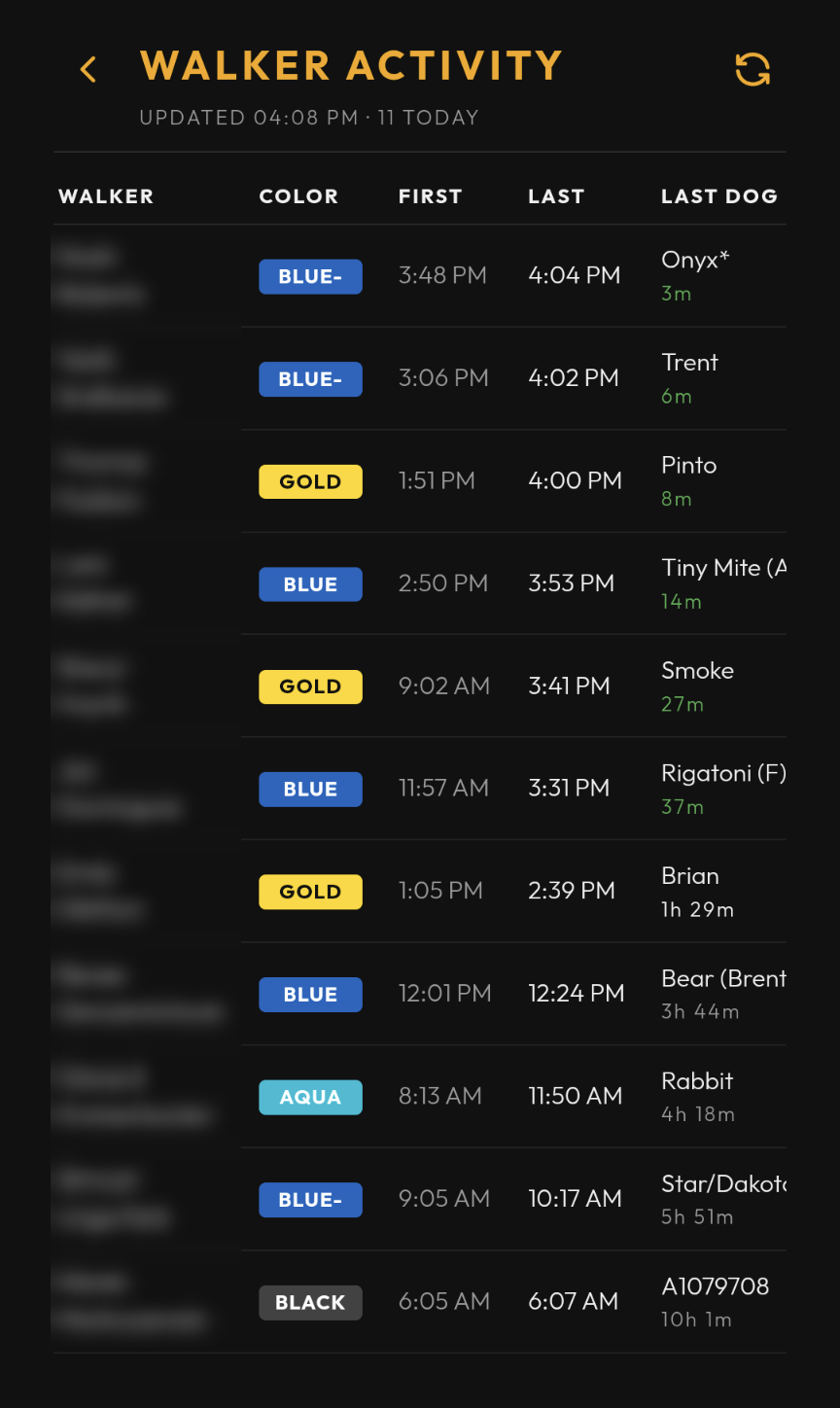
Each row shows:
- WALKER — their name, first name over surname.
- COLOR — that walker’s own color grade, not any dog’s.
- FIRST — the first W1/W2/PG they logged today.
- LAST — the most recent one.
- LAST DOG — the dog behind that last entry, with how long ago underneath
(
now,14m, and then just> 1hfor anything past an hour). It reads green under 45 minutes — they’re almost certainly still here — and plain text after that. That’s a reading aid, not a status: nothing tracks whether someone has actually left, only when they last logged something, and a walker on a long walk looks exactly like one who went home. LAST has the exact time if you need it.
Only logging counts as activity. Undoing a walk is a correction, so it never moves someone’s LAST time or renames their LAST DOG.
Under the title, UPDATED 8:47 AM · 6 TODAY tells you when the rows were
built and how many walkers are on them. The screen refreshes itself every
couple of minutes and whenever you come back to the app, and the elapsed times
tick every minute in between — tap the refresh icon if you want it now.
A walker shows up here only once they’ve logged something today, so an early shift with nothing logged yet looks the same as an empty shelter: NO WALKS LOGGED YET TODAY.
Settings
Open Settings from the nav menu. Walker-facing options:
- WALKER PROFILE — your color level (read-only, set by an admin). Hidden for guest accounts, which have no color grade of their own.
- APPEARANCE — Theme (dark / light), Font size, Action buttons (nav at top or bottom, for one-handed use), and the Timer toggle.
- NOTIFICATIONS — Push notifications shows your device’s current permission as read-only status text: ENABLED, NOT YET ENABLED, or BLOCKED — ENABLE IN DEVICE SETTINGS. That row has no toggle — enabling or disabling notifications happens in your device’s own settings. If you haven’t enabled them yet, a banner may prompt you to ENABLE from the roster screen; tapping it triggers the one-time OS permission prompt. Shift Reminders (on by default) — after you log your first walk or playgroup of a shift, a prompt offers to send you to the Bloomerang kiosk to check in. Turn it off here.
Two of those APPEARANCE options change enough about how the app behaves to be worth their own walkthrough:
The walk timer
If you enable Timer in Settings → APPEARANCE, a small mm:ss timer
appears on the roster page — in the header (top nav) or bottom-right (bottom
nav) — to help you keep track of how long you’ve had a dog out. Tap it to open
play / pause / reset controls, and reset it each time you head out with a new
dog. It caps at 30:00.
Action buttons
Settings → APPEARANCE → Action buttons lets you move the header’s icon buttons (back, refresh, menu, and so on) between TOP (the normal header) and BOTTOM — a bar docked near the bottom of the screen instead. If you’re navigating the app one-handed, BOTTOM keeps those buttons within thumb reach instead of making you stretch to the top of the screen.
FAQ
Where did the roster checkboxes go? Walk logging moved to the dog’s page — tap a row, then use the Log Walk / Log Playgroup buttons above ACTIVITY TODAY.
Why didn’t a logged walk show up right away? Normally it does — writes push an instant update to every connected device. If your phone was backgrounded (screen locked or you switched apps) for a while, it may have missed that push; it re-syncs the moment you bring the app back to the foreground. Still stale? Pull to refresh.
Why is a dog dimmed? Its color grade is higher than yours. You can still open it, but it’s not on your walk list today.